- Home Page /
- Electronics /
- Computer Accessories /
- Computer Accessories & Peripherals /
- Computer Hard Drive Accessories /
- Mounting Brackets /
- zimablade 2 Bay HDD Rack Tray Dual 3.5'' stor...
0 ratings






Item #:
86473345
zimablade 2 Bay HDD Rack Tray Dual 3.5'' storage drive stand
Item #:
86473345
USD 30
Price Details
Excluding Shipping & Custom charges ( Shipping and custom charges will be calculated on checkout )
*All items will import from US
0 ratings
Write a review
In stock
 Imported from USA store
QTY:
Order now and get it around Thursday, June 25
Secured transaction
Ubuy works hard to protect your security and privacy. Our advanced payment security system ensures confidentiality by encrypting your information during transmission using AES (Advanced Encryption Standards) and SSL (Secure Socket Layer) protocols. Your payment details are 100% secure as we do not share your payment details with third party sellers.
Our Top Logistics Partners


Crafted with precision from high-quality materials, the stand provides a stable and secure platform for your drives, preventing accidental slips or falls.

Fast
Shipping

Free
Return*

Secure Packaging

100% Original Products

PCI DSS Compliance

ISO 27001 Certified


Note: Step Down Voltage Transformer required for using electronics products of US store (110-120). Recommended power converters Buy Now.


What Stands Out
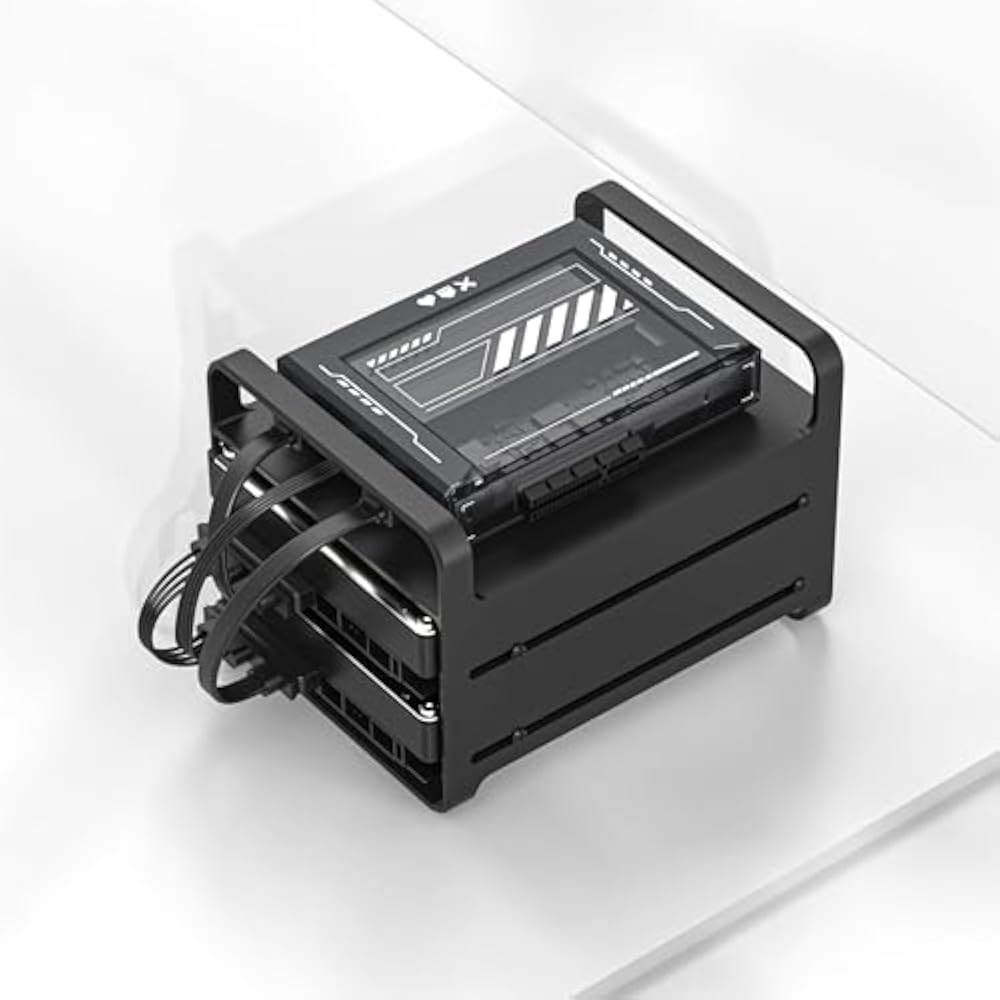
Dual HDD Capability
Accommodates two 3.5'' storage drives simultaneously, allowing for increased storage capacity and easy data management, perfect for users with extensive data needs.
Efficient Design
Optimized for ZimaBlade systems, ensuring seamless integration and minimal setup hassle, thereby saving time and enhancing productivity.
Durable Build Quality
Constructed from high-quality materials that provide long-lasting performance and reliability, ensuring your data is safely stored and protected.
Product Details
- Dual Drive Capacity: Accommodates two 3.5-inch storage drives, allowing you to keep your data storage organized in one central location.
- Sturdy Construction: Crafted with precision from high-quality materials, the stand provides a stable and secure platform for your drives, preventing accidental slips or falls.
- Space-Saving Design: The compact footprint of the stand optimizes desk space, making it an ideal choice for both home and office environments.
- Efficient Cooling: The open design of the stand facilitates excellent airflow around the drives, preventing overheating and ensuring optimal performance.
- Easy Accessibility: The vertical orientation of the drives allows for quick and convenient access, reducing the hassle of searching for specific drives.
- Elegant Aesthetics: The modern and minimalist design of the stand adds a touch of sophistication to your workspace, complementing any desktop setup.
| Additional Features | Space Saving |
| Shelf Type | Tray |
| Number of Shelves | 2 |
| Room Type | Study Room |
| Mounting Type | Tabletop |
| Recommended Uses For Product | Computer Storage Drives |
| Is Customizable? | No |
| Indoor Outdoor Usage | Indoor |
| Material Type | Zinc-aluminum alloy |
| Finish Types | Powder Coated |
| Color | black |
| Style Name | Modern |
| Included Components | no |
| Brand Name | zimablade |
| Model Number | ZBA039-US |
| Manufacturer Part Number | ZBA039-2 |
| Manufacturer | zimablade |
| Unit Count | 1.0 Count |
| Item Type Name | drive stand |
| Item Dimensions D x W x H | 1.97"D x 1.97"W x 1.97"H (5 x 5 x 5 cm) |
| Required Assembly | Yes |
| Material | Zinc-aluminum alloy |
| Special Feature | Space Saving |
| Product Dimensions (L x W x H) | 1.97"D x 1.97"W x 1.97"H (5 x 5 x 5 cm) |
Who Should Buy?

-
Data Storage Enthusiasts
Ideal for users who require additional storage for large files, such as videos and high-resolution images.
-
Media Professionals
Great for filmmakers and photographers needing efficient access to multiple hard drives for their projects.
-
Home Servers
Perfect for individuals setting up a home server for media streaming or backup solutions, enhancing data management.

-
Casual Users
Not suitable for those with basic storage needs who don't require dual hard drive solutions or advanced features.
-
Mobile Users
Not ideal for users needing portable storage, as this product is designed for stationary setups.
-
Budget-Conscious Buyers
May not be the best choice for users looking for cost-effective, lower-capacity storage options.
Product Description
Have any Query? Chat with us
Customer Questions & Answers
-
Question:
What is a 2 Bay HDD Rack Tray?
Answer: A 2 Bay HDD Rack Tray is a storage solution that allows you to securely hold two 3.5-inch hard drives. This type of tray enhances the organization of your drives while providing easy access for installation and removal. The design typically includes features that stabilize the drives and prevent movement during operation. It’s ideal for users looking to expand their storage capabilities, such as for a home media server or as part of a desktop setup for a gaming rig. -
Question:
How does dual HDD support enhance performance?
Answer: Dual HDD support allows for simultaneous use of two hard drives, which can significantly enhance data processing and access speeds. This configuration is particularly useful for tasks like video editing or managing large databases, where read and write operations can happen concurrently. With RAID configurations, you can even achieve redundancy, further protecting your data and improving performance, making it a favored setup among professionals and tech enthusiasts. -
Question:
Can I use SSDs with a 2 Bay HDD Rack Tray?
Answer: Yes, many 2 Bay HDD Rack Trays are designed to support both HDDs and SSDs, provided they fit the specified size limits. Using SSDs can improve performance due to their faster read and write speeds compared to traditional HDDs. This versatility allows users to mix different types of storage to optimize speed while maintaining larger HDDs for bulk storage, making it a flexible solution suited for various user needs. -
Question:
What are the key features to look for in a HDD rack tray?
Answer: When choosing a HDD rack tray, key features to consider include build quality, ease of installation, thermal management, and compatibility with different drive interfaces. A well-built tray ensures durability, while good thermal management features prevent overheating. Installation should be straightforward, possibly with tool-less entry. Compatibility is crucial to confirm that the rack can handle the drives you intend to use, including any specific connector types like SATA or IDE. -
Question:
Is a RAID configuration possible with this HDD rack tray?
Answer: Yes, many 2 Bay HDD Rack Trays support RAID configurations, such as RAID 0, RAID 1, and JBOD. This capability enables users to create a more secure and efficient storage system. RAID 0 offers faster performance by splitting data between the drives, while RAID 1 provides redundancy by mirroring data on both drives, which is essential for data protection. Ideal for users who prioritize data security and speed in their storage solutions. -
Question:
What materials are commonly used in HDD rack trays?
Answer: Most HDD rack trays are constructed from materials like aluminum or high-quality plastic, designed for durability and effective heat dissipation. Aluminum is often preferred due to its lightweight yet sturdy properties and superior heat management capabilities, making it an effective choice for high-performance systems. High-quality plastics are also effective and may offer additional weight savings, depending on the use case. -
Question:
How can I install a 2 Bay HDD Rack Tray?
Answer: Installing a 2 Bay HDD Rack Tray typically involves securing it into a compatible desktop chassis or server using predefined mounting points. Most trays come with a user-friendly design that often allows for tool-less installation. Simply slide the drives into the tray, ensuring they are securely connected, and then mount the tray in your system. This straightforward process allows users to upgrade their storage without extensive technical knowledge. -
Question:
What are the benefits of using a storage drive stand?
Answer: Using a storage drive stand, like the 2 Bay HDD Rack Tray, offers several benefits, including organized storage, ease of access to drives, and improved cooling. By keeping drives elevated and in a designated space, users can manage their storage more efficiently. Enhanced airflow around the drives also helps in maintaining optimal operating temperatures, which is crucial for performance and longevity, especially in high-load scenarios. -
Question:
Are there any compatible accessories for the 2 Bay HDD Rack Tray?
Answer: Yes, accessories such as SATA cables, power connectors, and additional cooling options can enhance the functionality of your 2 Bay HDD Rack Tray. SATA cables are essential for connecting your drives to the motherboard, while power connectors ensure your drives receive the necessary energy. Additionally, cooling fans can be added if your system requires enhanced airflow, particularly in high-performance setups that may generate more heat. -
Question:
Where can I buy a 2 Bay HDD Rack Tray Dual 3.5 storage drive stand?
Answer: You can purchase a 2 Bay HDD Rack Tray Dual 3.5 storage drive stand on Ubuy in Zimbabwe. Ubuy offers a vast selection of tech products, often with various shipping options and promotional deals, ensuring you find the right product to suit your needs.
zimablade Mounting Brackets ZBA039-US Editorial Review


The 2 Bay HDD Rack Tray for Dual 3.5'' Storage Drive Stand has garnered a largely positive response from users who appreciate its robust build and aesthetic appeal. Customers have praised its quality craftsmanship, noting that the metal finish is not only attractive but also efficient in dissipating heat from the drives. The open-frame design allows for easy access and air circulation, making it an effective solution for housing dual HDDs. Users have highlighted the perfect fit of standard 3.5’’ drives and the robust Construction of the rack, which feels sturdy and premium. Despite some users wishing for better provisions for cooling and cable management, they recognize it as a solid investment in drive storage. The rack is lightweight, complemented by no-slip rubber on its base, ensuring stability. However, it’s worth mentioning that the product does not come with any mounting hardware, leading some users to express disappointment given its price point. While the functionality is praised, it’s clear that users find value in its design—many stating that they appreciate its aesthetic and the overall premium look it brings to their NAS or SBC setups. Although some users have pointed out the absence of features like a cooling fan mount or cable anchoring options, the majority of reviews lean toward recommending this product for those looking for an elegant and effective way to manage their hard drives. **
Customer Reviews & Ratings
49 customers ratings
-
5 Star
64%
-
4 Star
22%
-
3 Star
7%
-
2 Star
4%
-
1 Star
3%
Review this product
Share your thoughts with other customers
Pros
- Excellent build quality and finish
- Lightweight and sturdy design
- Efficient heat dissipation from HDDs
- Attractive, premium appearance
- Perfect size for dual 3.5” drives
Cons
- No provision for a cooling fan
Related Categories
Related Brands
Product Price History
Important information
- Limitations : For products shipped internationally, please note that any manufacturer warranty may not be valid; manufacturer service options may not be available; product manuals, instructions, and safety warnings may not be in destination country languages; the products (and accompanying materials) may not be designed in accordance with destination country standards, specifications, and labeling requirements; and the products may not conform to destination country voltage and other electrical standards (requiring use of an adapter or converter if appropriate). The recipient is responsible for assuring that the product can be lawfully imported to the destination country. When ordering from Ubuy or its affiliates, the recipient is the importer of record and must comply with all laws and regulations of the destination country.
- Not all the products listed on Ubuy are for sale, as Ubuy is a global search engine. Products are subject to export/trade regulations.
USD 30
Order now and get it around Thursday, June 25
This item is not restrict in my country.(Please click on above link if this item is not restrict in your country, So our team will review and allow.)
QTY:
Secured transaction
Ubuy works hard to protect your security and privacy. Our advanced payment security system ensures confidentiality by encrypting your information during transmission using AES (Advanced Encryption Standards) and SSL (Secure Socket Layer) protocols. Your payment details are 100% secure as we do not share your payment details with third party sellers.
Our Top Logistics Partners
Fastest cross-border delivery
Features & Benefits
- Zinc-aluminum alloy
- Accommodates two 3.5-inch storage drives of various makes and models
- Tool-free assembly for quick setup
- Provides stable and secure platform for drives
- Compact footprint optimizes desk space
- Open design facilitates airflow around drives